Difference between revisions of "Mail"
(→Sending Mail) |
|||
| (11 intermediate revisions by the same user not shown) | |||
| Line 7: | Line 7: | ||
The Mail System allows players to send messages, items, and gold to other characters through mailboxes located at each bank. Mail can be accessed from any mailbox, and recipients do not need to be online when it is sent. | The Mail System allows players to send messages, items, and gold to other characters through mailboxes located at each bank. Mail can be accessed from any mailbox, and recipients do not need to be online when it is sent. | ||
| − | == | + | == Mail Interface == |
| − | + | <gallery mode="packed" heights="260px"> | |
| − | + | File:MailInbox.png|View received and unread mail | |
| − | + | File:MailCompose.png|Compose a new message | |
| + | File:MailRead.png|Read mail and collect attachments | ||
| + | </gallery> | ||
| − | + | == Features == | |
| − | Server-wide | + | * Server-wide mail accessible from any mailbox |
| − | + | * Messages delivered after approximately twenty minutes | |
| − | Partial character-name recipient search | + | * Notifications for newly delivered and unread mail |
| − | Anonymous mail | + | * Up to 100 inbox messages per character |
| − | Replies to non-anonymous messages | + | * Partial character-name recipient search |
| − | + | * Anonymous mail | |
| − | + | * Replies to non-anonymous messages | |
| − | + | * Gold on Delivery for selling attached items directly to another player | |
| − | |||
| − | |||
| − | |||
== Sending Mail == | == Sending Mail == | ||
| − | + | Select '''Compose''' from the inbox to create a new message. | |
| − | |||
| − | Select '''Compose''' from the inbox to | ||
| − | + | Sending mail costs '''10 gold''', plus an additional '''5 gold per attached item'''. Any gold included with the message is withdrawn separately. | |
| − | + | Each message may include: | |
| − | |||
| − | |||
| − | + | * Up to five item attachments | |
| + | * A combined attachment weight of up to 500 stones | ||
| + | * Up to 20,000 gold | ||
| − | + | == Attachments == | |
| − | |||
| − | + | Attachments must be taken from the sender's backpack. Immovable, blessed, and otherwise restricted items cannot be mailed. Containers must be empty. | |
| − | + | Recipients can use the '''Take All''' button to collect every attached item and any included gold. | |
| − | + | == Gold on Delivery == | |
| − | |||
| − | |||
| − | + | '''Gold on Delivery''' allows the sender to set a price that the recipient must pay before collecting the attached items. | |
| − | + | Gold on Delivery mail must include at least one item attachment and cannot also contain gold for the recipient. | |
| − | + | When the recipient selects '''Take All''', a confirmation window displays the full delivery price. If accepted, the gold is withdrawn from the recipient's backpack and the attachments are collected. The payment is then automatically sent back to the original sender through the Mail System. | |
| − | |||
| − | + | If the recipient does not have enough gold, or cancels the confirmation, no gold or attachments are exchanged. | |
== Unclaimed Mail == | == Unclaimed Mail == | ||
| − | Unclaimed items or | + | Unclaimed items, included gold, or Gold on Delivery attachments are automatically returned to the sender after '''14 days'''. No Gold on Delivery payment is charged when mail is returned. |
| − | Returned mail | + | The original message remains in the recipient's inbox and can still be read or deleted normally. Returned mail does not expire. |
== Pull Scroll == | == Pull Scroll == | ||
| Line 71: | Line 64: | ||
Once all attachments and gold have been claimed, a message can be removed from the inbox and preserved as a physical scroll. The scroll retains the sender, subject, and written message. | Once all attachments and gold have been claimed, a message can be removed from the inbox and preserved as a physical scroll. The scroll retains the sender, subject, and written message. | ||
| − | + | __NOTOC__ | |
Latest revision as of 18:09, 2 September 2026
Mail System
The Mail System allows players to send messages, items, and gold to other characters through mailboxes located at each bank. Mail can be accessed from any mailbox, and recipients do not need to be online when it is sent.
Mail Interface
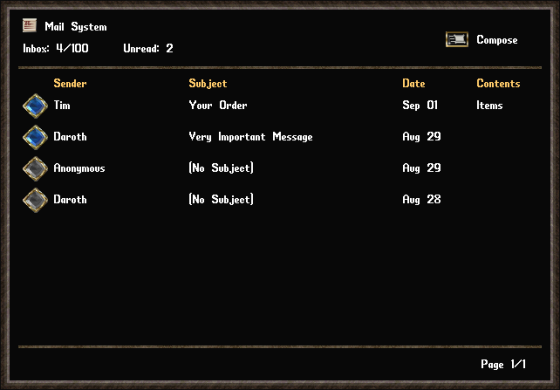
View received and unread mail

Compose a new message
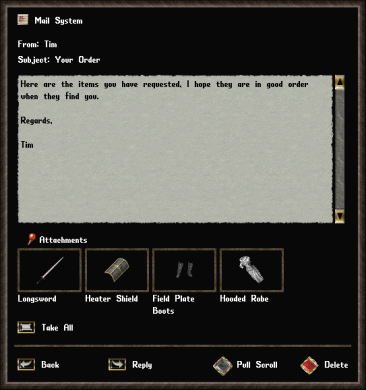
Read mail and collect attachments


Features
- Server-wide mail accessible from any mailbox
- Messages delivered after approximately twenty minutes
- Notifications for newly delivered and unread mail
- Up to 100 inbox messages per character
- Partial character-name recipient search
- Anonymous mail
- Replies to non-anonymous messages
- Gold on Delivery for selling attached items directly to another player
Sending Mail
Select Compose from the inbox to create a new message.
Sending mail costs 10 gold, plus an additional 5 gold per attached item. Any gold included with the message is withdrawn separately.
Each message may include:
- Up to five item attachments
- A combined attachment weight of up to 500 stones
- Up to 20,000 gold
Attachments
Attachments must be taken from the sender's backpack. Immovable, blessed, and otherwise restricted items cannot be mailed. Containers must be empty.
Recipients can use the Take All button to collect every attached item and any included gold.
Gold on Delivery
Gold on Delivery allows the sender to set a price that the recipient must pay before collecting the attached items.
Gold on Delivery mail must include at least one item attachment and cannot also contain gold for the recipient.
When the recipient selects Take All, a confirmation window displays the full delivery price. If accepted, the gold is withdrawn from the recipient's backpack and the attachments are collected. The payment is then automatically sent back to the original sender through the Mail System.
If the recipient does not have enough gold, or cancels the confirmation, no gold or attachments are exchanged.
Unclaimed Mail
Unclaimed items, included gold, or Gold on Delivery attachments are automatically returned to the sender after 14 days. No Gold on Delivery payment is charged when mail is returned.
The original message remains in the recipient's inbox and can still be read or deleted normally. Returned mail does not expire.
Pull Scroll
Once all attachments and gold have been claimed, a message can be removed from the inbox and preserved as a physical scroll. The scroll retains the sender, subject, and written message.
